Introduction
For all the wrong reasons, we have been treating meetings as a proxy for productivity. Equally, we have failed to use them to resolve entirely preventable issues. The problem is not the meeting itself; it is that it wasn’t used effectively in the first place 1 2.
Five thousand knowledge workers across four continents took part in a survey conducted by Australian software giant Atlassian. The vast consensus among those respondents: Nothing wastes more of their time than meetings.
https://www.atlassian.com/blog/workplace-woes-meetings
In this article, I will be discussing how a meeting should be organised to achieve optimum productivity in your remote teams. These points will provide a great addition to your organisation’s policy for ‘Efficient Remote Team Meetings’.
Meeting or a message in Slack/Teams?
Before you book your meeting, ask this question: ‘Should this be a meeting or a simple message in the chat app?‘. Sometimes, all we need is to follow up on a task. For example, ‘how are we performing on a given task?’, ‘How much has been achieved?’ and ‘How much left?’. To check on these things, you don’t need to book a 30-minute meeting. You can simply drop a message.
Subject
Some topics need to be discussed with an audience on the spot, instead of sending a message. Some of these topics are:
- A brainstorming session with a clearly defined agenda, outcome & participants.
- Discussing a problem that is affecting organisation-wide/department operations.
- Discussing a concern/problem your team member might be going through.
- Checking on your team members’ general well-being & happiness periodically.
- A conversation where non-verbal cues matter to draw decision.
- A knowledge sharing session where multiple rounds of message conversation proved no success, and so on.
The premise is to ensure the subject matter justifies a meeting over a chat conversation. Not just the feeling of having a call to share some information, even if it’s for five to ten minutes.
Structure & ownership
A clearly defined subject alone is not going to help run a successful meeting remotely. The meeting should have a proper structure. For example,
- Agenda: Start and end times & list of topics/subtopics.
- Participants: Who are the general participants & key participants? What happens if one of the key participants becomes suddenly unavailable (e.g., takes ill)? Should the meeting be postponed or continued with the available audience? Are these participants essential to the success of this meeting?
- Meeting Setting: A note about turning on the video camera, background, noise check, etc.
- Ownership: Who owns the meeting? If it’s a multi-host meeting, who owns what part of the meeting?
- Outcome: What are we trying to achieve at the end of the meeting? If the intended outcome was not achieved at the end of the meeting, what are the next steps?
- Next steps: Is a follow-up meeting required? Who is responsible for arranging the next step?
- Questions: Is a Q&A section necessary at the end of the meeting? Should the question session be an async message?
The bottom line is that the more you understand the whole anatomy of the meeting, the more you can save and utilise time efficiently.
Outcome
During many remote meetings, I have seen that the outcome of the meeting gets blurred as the meeting progresses. The main reason I find is the lack of clearly defined goals at the beginning of the meeting.
Sometimes there are defined outcomes; however, as the meeting progresses, the outcome becomes more and more unrealistic.
Therefore, it is essential to define realistic outcomes. This is where SMART3 approach shines. The SMART (Specific, Measurable, Achievable, Relevant, Time-bound) framework is a goal-setting methodology used to ensure objectives are clear, trackable, and attainable. Also, set expectations if the desired outcome is not met.
Participants & their calendars
In my profession as a tech leader, I have seen many occasions where people are not mindful of participants’ schedules and well-being. A major point is not checking participants’ calendars before setting up a meeting. The meeting is booked either fully or partially overlapping with the participant’s existing meetings.
The other important observation is not leaving a reasonable gap between meetings before scheduling a new one. When people hop meetings all day long, there is no time to process what happened during meetings and note down key/action points discussed. Hence, the desired outcome of the meeting might not be attained to the greatest detail.
The key takeaways are to be mindful of others’ calendars and leave at least 15-20 minutes between meetings.
Length of the meeting
The longer the meeting goes, the more time participants will be staying away from doing things that add value to the organisation. I am not saying meetings don’t add value. If a quick check-in with the team takes 2 hours, that is surely time not spent efficiently if the topic only involves half of the participants.
- Keep quick check-ins around 5 minutes per person (e.g., in a daily standup).
- If a quick check-in turns out to be a deep dive discussion, take that discussion outside the meeting under a separate subject.
- For deep dive technical discussions, start with a 1-hr block with absolutely necessary participants. If a 1-hr block is not enough, book another 1-hr slot.
- For 1:1 mentor sessions, 30 to 40 minutes is reasonable.
Some video call apps have the feature to add a running timer4 to a meeting.
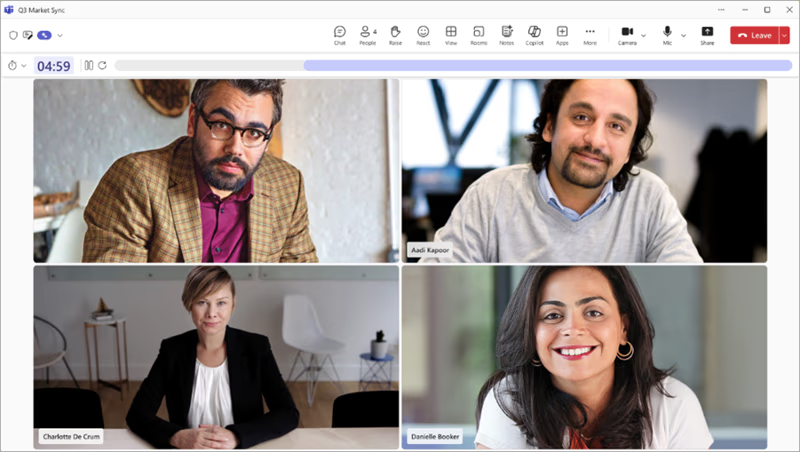
The key takeaway is to be mindful of the time when you schedule meetings.
Opening moment
Unless you intend to discuss a critical situation your organisation is facing, there should always be at least a few minutes to bond with the participants before the meeting begins. In my opinion, an ‘opening moment’ timeslot for about 5-10 minutes should be added as the first item in the meeting agenda if the participant count is no more than 5, at least once a day.
Warming up with the participants before discussing the meeting topic helps them get to know each other and create a comfortable, friendly learning setting before the main content starts. Don’t forget, at the end of the day, it’s people we are dealing with; therefore, making sure everyone feels comfortable before the meeting begins is a responsibility of the meeting host, not an optional extra.
Meeting cost
What most of us always forget is that ‘time = money’. Whether you spend time on a meeting or on something else, the cost keeps accumulating.
For example, a 1-hour meeting with five participants whose average salary is about £100,000 per annum costs the company £260. If you do this daily, by the end of the month, it will have cost the company about £5,200.
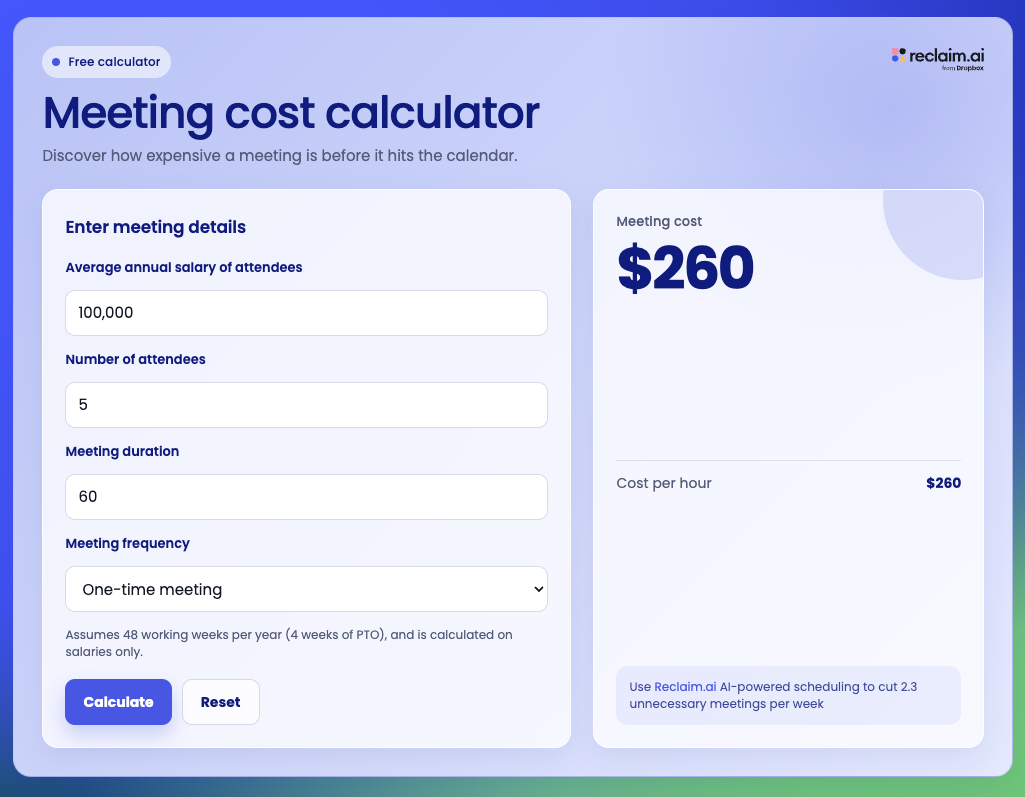
There are free online tools you can use to find out how much your meeting costs the company5. Therefore, next time you schedule a meeting, be mindful of how much it is going to cost the company.
In a Nutshell
Throughout this article, we have discussed key points that are vital to hosting a productive meeting. Not all conversations need a live meeting. We tend to misjudge a simple follow-up message on the chat as a 30-minute video call. On the other hand, communication is the ‘backbone’ of a productive, highly-efficient remote team.
Meetings are a fundamental collaboration mechanism that should be used thoughtfully. In my experience, the remote teams that shine are the ones who embrace uninterrupted focus time, appreciate autonomy, and collaborate efficiently when necessary and understand the problem they are solving from the business’s point of view.
Sources
- https://fortune.com/2024/03/21/meetings-productivity-ineffective-atlassian-report/ ↩︎
- https://hbr.org/2022/03/dear-manager-youre-holding-too-many-meetings ↩︎
- https://www.ucop.edu/local-human-resources/_files/performance-appraisal/How+to+write+SMART+Goals+v2.pdf ↩︎
- https://support.microsoft.com/en-gb/topic/add-a-timer-to-teams-meetings-9fa0f500-25be-4b08-9eb9-625846e916d2 ↩︎
- https://reclaim.ai/meeting-cost-calculator ↩︎